Up arrow in mags does not do what is expected...
I have 13 screens of magazines (373 different magazines, with several thousand issues).
When I'm on say screen 3, and select a magazine, and then select the up arrow; rather than take me back to screen 3, it goes to screen 1.
This means if I want to get back to mags on screen 7 I have way too many extra clicks.
Thank you for this great app!

 I cant open the admin page
HI
I am on Debian Buster and I downloaded Jre 1.8.191 to use with Ubooquity.
I run it with
/opt/jre_1.8.191/bin.java -jar Ubooquity.jar
It works I can open the default user page but I am unable to do anything admin line
Clicking on Admin button does not do anything :(
See the logs
https://paste.debian.net/hidden/48459fa1/
Any ideas?

admin screen not showing up on headless Ubuntu server. Ubooquity seems to be running ok.
Hey guys,
I'm trying to run the Ubooquity.jar on a headless Ubuntu 18.10 box and despite the fact the terminal seems to indicate it is running I am unable to access it via http://YOUR_IP:2203/admin
The command I am running is
java -jar Ubooquity.jar --remoteadmin --headlessThis is the output from terminal;
20190104 12:26:04 [main] INFO com.ubooquity.Ubooquity - Running with the following parameters - headless: true, libraryport: -1, adminport: -1, remoteadmin: true, host: null, debug: false, execdir: /opt/Ubooquity
20190104 12:26:04 [main] INFO com.ubooquity.Ubooquity - #############################
20190104 12:26:04 [main] INFO com.ubooquity.Ubooquity - # Starting Ubooquity #
20190104 12:26:04 [main] INFO com.ubooquity.Ubooquity - #############################
20190104 12:26:04 [main] INFO com.ubooquity.Ubooquity - Java version: 1.8.0_191
20190104 12:26:04 [main] INFO com.ubooquity.Ubooquity - Java vendor: Oracle Corporation
20190104 12:26:04 [main] INFO com.ubooquity.Ubooquity - java vm name: OpenJDK 64-Bit Server VM
20190104 12:26:04 [main] INFO com.ubooquity.Ubooquity - java runtime name: OpenJDK Runtime Environment
20190104 12:26:04 [main] INFO com.ubooquity.Ubooquity - Max heap size available: 7118 MB
20190104 12:26:04 [main] INFO com.ubooquity.Ubooquity - OS name: Linux
20190104 12:26:04 [main] INFO com.ubooquity.Ubooquity - OS version: 4.18.0-13-generic
20190104 12:26:04 [main] INFO com.ubooquity.Ubooquity - OS architecture: amd64
20190104 12:26:04 [main] INFO com.ubooquity.Ubooquity - Loading local version info
20190104 12:26:04 [main] INFO com.ubooquity.Ubooquity - Ubooquity 2.1.2 built on 2018-10-14 at 12:58
20190104 12:26:04 [main] INFO com.ubooquity.Ubooquity - Creating application folders
20190104 12:26:05 [main] INFO com.ubooquity.Ubooquity - Loading preferences
20190104 12:26:06 [main] INFO org.eclipse.jetty.util.log - Logging initialized @8287ms to org.eclipse.jetty.util.log.Slf4jLog
20190104 12:26:06 [main] INFO com.ubooquity.b - Starting internal server...
20190104 12:26:06 [main] INFO com.ubooquity.b - Reverse proxy prefix is not activated
20190104 12:26:06 [Scanner thread] INFO com.ubooquity.data.feeder.a - Scanning books directories
20190104 12:26:06 [Scanner thread] INFO com.ubooquity.data.feeder.a - Finished scanning books directories, populating folders content cache
20190104 12:26:06 [Scanner thread] INFO com.ubooquity.data.feeder.a - Books folder content cache populated
20190104 12:26:06 [Scanner thread] INFO com.ubooquity.data.feeder.a - Scanning comics directories
20190104 12:26:06 [Scanner thread] INFO com.ubooquity.data.feeder.a - Finished scanning comics directories, populating folders content cache
20190104 12:26:06 [Scanner thread] INFO com.ubooquity.data.feeder.a - Comics folder content cache populated
20190104 12:26:06 [Scanner thread] INFO com.ubooquity.data.feeder.a - Comics statistics: [total: 0, added or updated: 0, removed: 0]
20190104 12:26:06 [Scanner thread] INFO com.ubooquity.data.feeder.a - Books statistics: [total: 0, added or updated: 0, removed: 0]
20190104 12:26:06 [main] INFO org.eclipse.jetty.server.Server - jetty-9.4.0.v20161208
20190104 12:26:06 [main] INFO o.e.j.server.handler.ContextHandler - Started o.e.j.s.h.ContextHandler@6c4906d3{/,null,AVAILABLE,@admin}
20190104 12:26:06 [main] INFO o.e.j.server.handler.ContextHandler - Started o.e.j.s.h.ContextHandler@65987993{/,null,AVAILABLE,@library}
20190104 12:26:06 [main] INFO o.e.jetty.server.AbstractConnector - Started library@38467116{HTTP/1.1,[http/1.1]}{0.0.0.0:2202}
20190104 12:26:06 [main] INFO o.e.jetty.server.AbstractConnector - Started admin@5b7a7f33{HTTP/1.1,[http/1.1]}{0.0.0.0:2203}
20190104 12:26:06 [main] INFO org.eclipse.jetty.server.Server - Started @8592ms
20190104 12:26:06 [main] INFO com.ubooquity.b - Internal server started. Listening on port 2202 (library) and 2203 (admin)
Tyep Q then ENTER to exit
20190104 12:26:07 [Timer-0] INFO com.ubooquity.Ubooquity - Checking latest available Ubooquity version from website
20190104 12:26:08 [Timer-0] INFO com.ubooquity.Ubooquity - Latest version available: 2.1.2 - Current version: 2.1.2
any thoughts on what the issue might be, or how I might go about trouble shooting it?
Cheers all

Wrong cover and file
Hello guys,
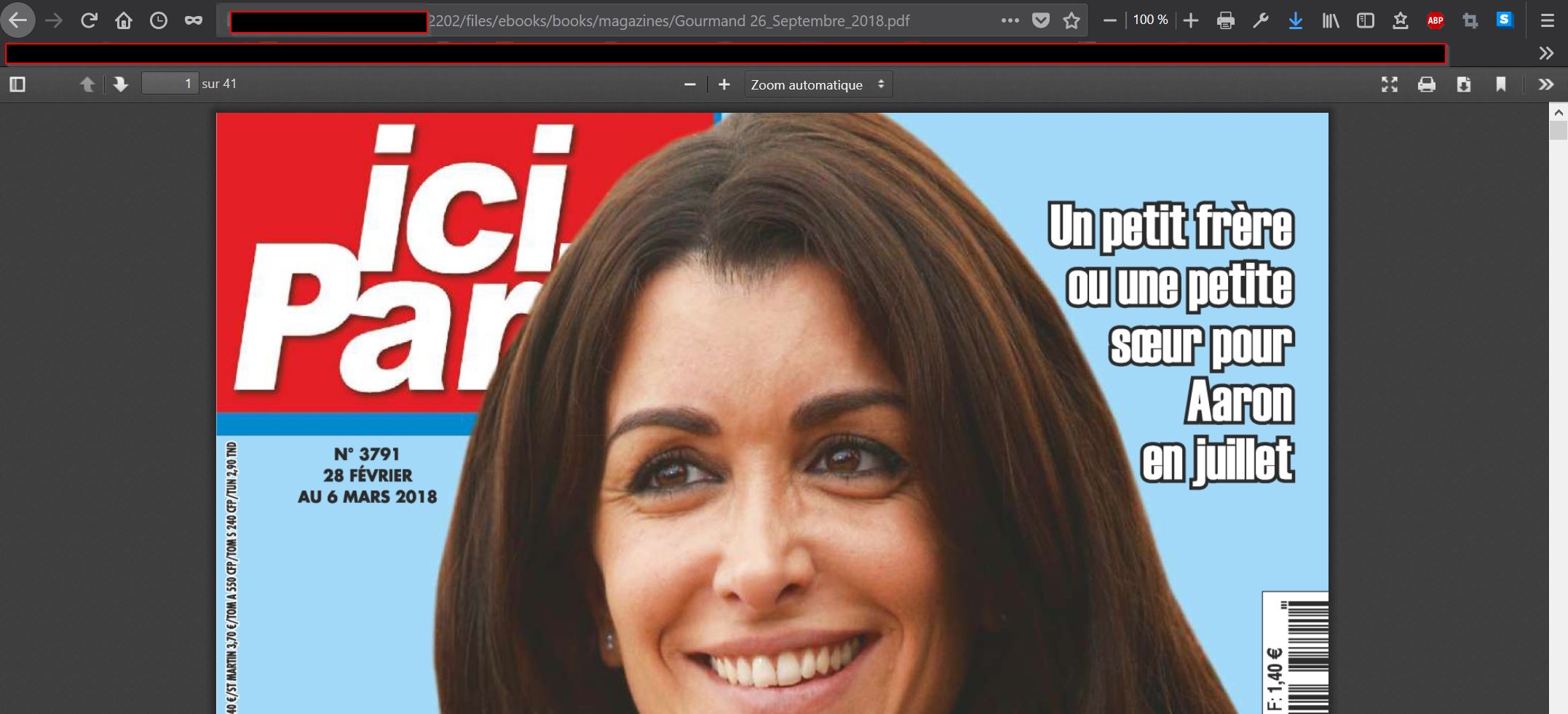
I have been faced with a rather strange problem. 2 of the PDF that I downloaded are with covers "Ici Paris" of February, 2018 while I have never downloaded this file. If I make "Read" it loads me this file from "wtf path" but when I DL on my desktop it is the good one. On the other hand if I open it in Raw files from Ubooquity it is this file Ici Paris which opens
.
https://i.goopics.net/VQyZ7.jpg
When I make "read" it's load this unknown file
https://i.goopics.net/94yjY.jpg
When I make DL and when it's open in Firefox I have this strange file:
https://i.goopics.net/Om2Qr.jpg
But if I make right click and to download on my desktop it is OK.
I have make a clear books database unsuccessfully. I connected in SSH but I do not see where is this famous file. It is freaking out:)

When I attempt to launch Ubooquity,I get this error in the log file.
20181227 12:30:26 [main] INFO com.ubooquity.Ubooquity - Running with the following parameters - headless: false, libraryport: -1, adminport: -1, remoteadmin: false, host: null, debug: false, execdir: C:\Users\Kestor Brown\Desktop\Ubooquity
20181227 12:30:26 [main] INFO com.ubooquity.Ubooquity - #############################
20181227 12:30:26 [main] INFO com.ubooquity.Ubooquity - # Starting Ubooquity #
20181227 12:30:26 [main] INFO com.ubooquity.Ubooquity - #############################
20181227 12:30:26 [main] INFO com.ubooquity.Ubooquity - Java version: 11.0.1
20181227 12:30:26 [main] INFO com.ubooquity.Ubooquity - Java vendor: Oracle Corporation
20181227 12:30:26 [main] INFO com.ubooquity.Ubooquity - java vm name: Java HotSpot(TM) 64-Bit Server VM
20181227 12:30:26 [main] INFO com.ubooquity.Ubooquity - java runtime name: Java(TM) SE Runtime Environment
20181227 12:30:26 [main] INFO com.ubooquity.Ubooquity - Max heap size available: 4084 MB
20181227 12:30:26 [main] INFO com.ubooquity.Ubooquity - OS name: Windows 10
20181227 12:30:26 [main] INFO com.ubooquity.Ubooquity - OS version: 10.0
20181227 12:30:26 [main] INFO com.ubooquity.Ubooquity - OS architecture: amd64
20181227 12:30:26 [main] INFO com.ubooquity.Ubooquity - Loading local version info
20181227 12:30:26 [main] INFO com.ubooquity.Ubooquity - Ubooquity 2.1.2 built on 2018-10-14 at 12:58
20181227 12:30:26 [main] INFO com.ubooquity.Ubooquity - Creating application folders
20181227 12:30:26 [main] INFO com.ubooquity.Ubooquity - Loading preferences
20181227 12:30:26 [main] INFO com.ubooquity.Ubooquity - Saving preferences
20181227 12:30:27 [main] INFO org.eclipse.jetty.util.log - Logging initialized @1576ms to org.eclipse.jetty.util.log.Slf4jLog
20181227 12:30:27 [Thread-2] INFO com.ubooquity.b - Stopping internal server...
20181227 12:30:27 [Thread-2] INFO com.ubooquity.data.feeder.a - Aborting content scan...
20181227 12:30:27 [Thread-2] ERROR com.ubooquity.b - Error while stopping internal server
java.lang.NullPointerException: null
at com.ubooquity.d.e.a(SourceFile:99) ~[Ubooquity.jar:2.1.2]
at com.ubooquity.b.c(SourceFile:112) ~[Ubooquity.jar:na]
at com.ubooquity.Ubooquity.C(SourceFile:216) ~[Ubooquity.jar:na]
at java.base/java.lang.Thread.run(Thread.java:834) ~[na:na]
20181227 12:30:27 [Thread-2] INFO com.ubooquity.b - Internal server stopped
20181227 12:30:27 [Thread-2] INFO com.ubooquity.Ubooquity - Ubooquity has closed.
I've attempted restarting the computer,and re-installing Java,but none of that seemed to fix this error.

 Ubooquity comics scanner should support expanded comics
The built-in comics reader is so painfully slow for me that I wrote a python tool which finds every CBR/CBZ in my directories and unpacks them to individual JPG files with the folder structure <publisher>/<title>/<volume>/<issue>/<pagenum>.jpg
Every tool I've tried fails to find any of the JPGs when they're expanded this way. It would be nice if Ubooquity could support it.

everything was working great then-
when trying to start it up one day i get-
20181224 18:24:17 [main] INFO com.ubooquity.Ubooquity - Loading preferences
20181224 18:25:40 [main] ERROR com.ubooquity.data.database.d - Cound not get number of existing tables
----
is there something that got corrupted.. a preference file or the database itself? and is there any way to repair it without reimporting 300000 books : ) : (
i tried removing then reinstalling java to no avail....

huge book collection issues
I have a huge FB2 book collection, installed Ubooquity via docker image (linuxserver/ubooquity) on my Synology DS916+.
The book scanning finished two days ago, I'm not able to see nether user nor admin web pages farther than first screen, database still growing every few minutes, current size is 30Gb.
I restarted docker image with increased memory for java, 1024M, and now can't connect to web UI at all. Logs have no errors, but stopped on "Loading preferences"
I'm curios, what does it do? Does it make sense to continue to wait?
I will be happy to provide any additional information

Run Ubooquity in background on start mac
Is it possible to run ubooquity on startup? Perhaps a deamon? I just don't want to have to manually start the server and keep my terminal open every time I want to use it.
Thanks!

Mix of Public and Protected Folders
Is there any way to have one folder available for access with user accounts, and to protect another folder with user accounts? I want to keep certain folders only accessible to me, and share others. Right now, I have created an account "guest" and just give my friends the username/password for that account. However, this is a bit cumbersome as they are already logging into my website, then accessing Ubooquity, so it is forcing them to use multiple passwords.
Instead, I was thinking it could be useful to allow them to actually be guests (and see all public folders), and only if they log on would they see any libraries shared to those accounts. For example, with calibreweb, I can manage the permissions of a dummy guest account, which would be the default view if not logged in. This allows people to view items as a guest, but requires them to log in if they want to download something. Some similar functionality could be useful in Ubooquity.
Customer support service by UserEcho